Chrome Pointer Harshavardan61: Android
Showing posts with label Android. Show all posts

Sunday, November 24, 2013

Where's My Water 2 Free Download


 Download Links:


Description:
Get ready to join Swampy, Allie, and Cranky on their NEXT exciting adventure!
The sequel to the most addicting physics-based puzzler from Disney has finally arrived. Where’s My Water? 2 launches with three brand new locations including the Sewer, the Soap Factory, the Beach. Best of all, the puzzles are all free! Cut through dirt, and guide fresh water, purple water, and steam to help Swampy and his friends!

Key Features:

• Play 100+ levels and challenges with a brand new look in the Gator universe featuring Swampy, Allie, Cranky, and Mystery Duck!

• Introducing ‘Challenge Modes’ to replay the levels in explosive new ways! 

• Dig as fast as you can and get as many duckies as possible in ‘Duck Rush’ levels!

• ‘Tri-ducking’ is now faster, better and more fun with boosts, such as Vacuum, Dropper, and Absorber! Small fees may be required for these additional boosts.

• Connect through Facebook and see if you can beat your pals on the adventure!

• Experience fun mechanics that are uniquely designed for each character!
Screen Shots:


Download Links:

Read More

Friday, November 22, 2013

Top 5 Android Launchers Latest Pro Version


This Pack Includes Top 5 Android Launchers Pro Version.

  • Action Launcher pro v1.9.1 patched.
  • Apex Launcher v2.1.0 + pro apk.
  • Next Launcher 3D v2.05 patched.
  • Nova Launcher v2.2.3 + Prime v1.1 + Notifier v2.3.
  • Smart Launcher v1.10.11 pro apk.


Download Links:

Screen Shots:
1.Action Launcher:
2.Apex Launcher 
3.Nova Launcher 
4. Smart Launcher
 5.Next Launcher

Download Links:


Read More

Tuesday, October 22, 2013

N7 Player FULL Version


Download Links:


Description
We have always believed that music player experience can be something more. This is exactly why we have created n7player 2.0. Many graphical improvements had been made and the user experience is even better than before. n7player no longer relies on Android Media Scanner and uses it's own media library.

Key features:
- Unique user interface, based on OpenGL, consisting of innovative, fully multi-touchable album covers wall
- Supported audio formats: mp3, mp4, m4a, ogg, wav, 3gp, mid, xmf, ogg, mkv(4.0+), flac (3.1+), aac (3.1+)
- 5 band graphic equalizer with presets – requires Android 2.3+
- Gapless playback
- Environmental effects, bass boost and sound virtualization technology (SRS/Dolby Surround) (2.3+)
- Automatic and manual album art and artist image downloader
- Tags editor for all supported audio formats
- File browser (SD card) with filters
- Skins
- 1x4, 2x4 widgets
- Lockscreen widget with direct unlock
- Headset support with many options
- Sleep timer
- Shuffle/repeat
- Lyrics support, using the embedded track lyrics & musicXmatch plugin
- Last.fm scrobbling
- Support for m3u playlists.

Reviews
"n7player makes browsing your own library and finding music to listen to fun again."
n7player is an innovative 3D mp3 and audio player available only on Android. It visualizes your music as a single plane full of album covers. You can zoom in and out using multi-touch to see different views of your music. The main application screen is like an interactive tag cloud which can be easily explored to find your mp3 files. Artist names transforms smoothly to album covers, when pinched-to-zoomed. The minimalistic design and smooth interface allows users to quickly pick their favorite music from their library.
n7player has also the most advanced cover art downloading function available on the market. It can download the missing album arts both by its own and by easy to use dedicated screen, where the user can search and pick an album art from the internet.
Android 2.3+ is required to use Equalizer & other sound effects.

Screenshots:


Download Links:


Read More

MX Player PRO-Ad Free Version


                  Download Links:

1.Click to Download-Mx Player Pro.apk


Description
THIS IS THE AD-FREE VERSION OF MX PLAYER.
MX Player - The best way to enjoy your movies.
a) HARDWARE ACCELERATION - Hardware acceleration can be applied to more videos with the help of new H/W decoder.
b) MULTI-CORE DECODING - MX Player is the first Android video player which supports multi-core decoding. Test result proved that dual-core device’s performance is up to 70% better than single-core.
c) PINCH TO ZOOM - Zoom in and out with ease by pinching and swiping across screen.
d) SUBTITLE SCROLL - Subtitles can be scrolled to move back and forth faster.
e) KIDS LOCK - Keep your kids entertained without having to worry that they can make calls or touch other apps. (plugin required)

Subtitle formats:
- DVD, DVB, SSA/ASS Subtitle tracks.
- SubStation Alpha(.ssa/.ass) with full styling.
- SAMI(.smi) with ruby tag support.
- SubRip(.srt)
- MicroDVD(.sub/.txt)
- SubViewer2.0(.sub)
- MPL2(.mpl/.txt)
- PowerDivX(.psb/.txt)
- TMPlayer(.txt)

Screenshots:


Download Links:

Read More

Thursday, October 3, 2013

Labyrinth-v1.5.2.apk


Description
Labyrinth is the classic game where you control a steel ball by tilting a wooden labyrinth. The game has over 1000 levels created by the community and you can easily create more levels of your own.
Features:
- Download new levels directly from within the game.
- 1000+ (yes one thousand) levels.
- 60 FPS (Where supported) 
- Shadows. 
- Optional 3d-walls, changing perspective when tilting phone. 
- Physics simulation when falling into holes. Makes it possible to slide on a hole edge without falling. 
- A carpenter level with calibration. 
- Autosaving of completed levels. 
- Easy starting levels for newbie players.
- Sound. 
- Tactile feedback. 
- Many more...
 

Screen Shots:


Download Links:

Read More

Saturday, September 28, 2013

Minuum Keyboard v1.1.3 APK


Download Links:


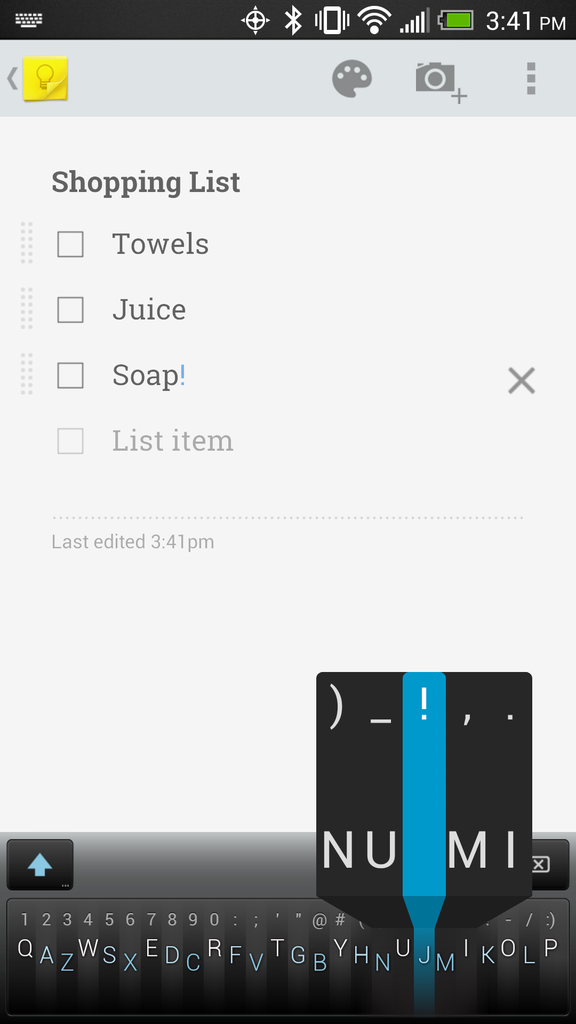
Minuum is a tiny, one-dimensional keyboard that frees up your screen space while allowing you to type fast and accurately. Type quickly without worrying about being precise, thanks to smart auto-correction.SIMPLIFIED TOUCHSCREEN TYPING
Most existing keyboards take an approach similar to cramming a full typewriter into a touchscreen device. This gives us keyboards that cover up half the usable touchscreen space (or more), obstructing your content. Minuum gives you back your screen space by reducing the standard keyboard to a single dimension.

HOW MINUUM WORKS IN PRACTICE
Minuum re-imagines the keyboard by minimizing a standard layout into a single line, letting you type quickly and accurately without needing large keys. This minimalism is enabled by a specialized auto-correction algorithm that allows highly imprecise typing. These algorithms interpret, in real time, the difference between what you type and what you mean, getting it right even if you miss every single letter.

DISCOVER MORE
The Minuum linear keyboard for touchscreens is just the first step toward a “type anywhere” future. Minuum will let you type on wearable devices like smart watches, game controllers, and more devices of minimum size. By supporting this app, you help to enable that vision.

MINUUM KEYBOARD FEATURES AT A GLANCE

MORE SCREEN SPACE
Recover more than half of the usable touchscreen space you lose when typing on traditional virtual keyboards.

FAST SLOPPY TYPING
Type fast without worrying about being precise, thanks to smart auto-correction.

LARGE-FINGER FRIENDLY
Use key magnification through a zoom view for precise entry of letters, numbers, and punctuation—especially useful if you have large fingers.

FAMILIAR KEYBOARD LAYOUT
You already know how to type with Minuum—it’s just the QWERTY layout, minimized.

DIFFERENT ALPHABET ARRANGEMENTS
Choose from alternate keyboard layouts—such as “QWERTZ,” “AZERTY,” “A-Z.”

FULL FUNCTIONALITY
Get everything you’d expect in a keyboard (such as, punctuation, space, backspace, and enter) without losing your screen space.

EXPANSION TO FULL-SIZED KEYBOARD 
Press with two fingers on the keyboard to switch between mini and full-sized modes (useful for URLs and passwords).

SMART WORD PREDICTION
Speed up your typing by choosing from suggestions made by a predictive engine that learns from you based on your word list, word combinations, and language use patterns.

VOCABULARY CONTROL
Minuum learns from your vocabulary, and you can delete words from your dictionary though a handy pop-up display.

GESTURE SHORTCUTS
Slide your fingers to the corners for quick, convenient access to all your features via pop-up keys.

LANGUAGE CAPABILITY
Initial beta releases of the Minuum keyboard are English-only, but as we widen the beta test we encourage you to give us feedback at support.minuum.com about adding different languages.

VOICE TYPING
Experience hands-free text entry via Google Voice Typing for voice-to-text typing when performing other activities.
What’s in this version : (Updated : Sep 18, 2013)


Fixed random capitalization issues
Improved accuracy
Fixed bugs in Samsung/HTC apps
Fixed interaction with hardware keyboards
Improved punctuation after candidate word choice
Required Android O/S : 2.3.3+
Screenshots :


Download Links:


Read More

Tuesday, August 27, 2013

How can I root my Android device?

Rooting Android devices using packages from F-Droid

There are several ways of rooting Android devices and there is no universal method, but if there are no measures taken by the manufacturer, chances are not that bad to get root by following the instructions below. Following this guideline, only packages from F-Droid will be pushed to your device. Keep in mind that we can't provide assistance for specific devices.
Everything is on YOUR OWN RISK! We are not responsible, if your device doesn't work or has some malfunctions. Also read "Should I root my device?".
Before you go on, enable Unknown Sources and USB debugging on your device:
  1. Menu -> System settings -> Security -> Unknown Sources -> Enabled
  2. Menu -> System settings -> Developer options -> USB debugging -> Enabled
Download and install 7-zip, download and install Android SDK, download OEM USB Drivers, download Google USB Driver, download Superuser and Terminal Emulator App.
Depending on your phone OEM USB Drivers or Google USB Driver may work. Often you have to install device specific drivers, provided by the manufacturer of your device. Install the appropriate driver to get ADB access over USB.
Rename org.fdroid.superuser*.apk to org.fdroid.superuser*.zip .
Extract org.fdroid.superuser*.zip with 7-zip or a similar program.
Copy "su" from org.fdroid.superuser_*\assets\armeabi to the folder from where you execute your ADB, on Microsoft Windows likely C:\WINDOWS\Android\android-sdk\platform-tools, depending on the path selected while installation. In case you can't find it, search for "adb.exe".
Open your shell (CMD.exe on Windows, e.g. Bash on Linux) and change directory to your ADB folder and type:
  1. adb kill-server
  2. adb root
  3. adb remount
  4. adb push su /system/xbin/su
  5. adb shell
  6. chown 0:0 /system/xbin/su
  7. chmod 6755 /system/xbin/su
  8. ln -s /system/xbin/su /system/bin/su
  9. adb reboot
Copy org.fdroid.superuser*.apk to the SD-card of your Android device and install it.
Copy jackpal.androidterm_53.apk to the SD-card of your Android device and install it.
Open "Terminal Emulator" on your Android device and type "su", then permanently allow root if a # appears in the beginning of the line, you now have root.
Note: Busybox is not in the F-Droid repository so far, thus we provide no link. You can try whether Busybox is already on the device by typing "busybox" in Terminal Emulator. It should give you a long list of commands, if it is installed.

Read More

Friday, May 24, 2013

Where's My Water-FULL VERSION(.apk) All Levels Unlocked(version:1.9.0)


Where’s My Water? is a challenging physics-based puzzler complete with vibrant graphics, intuitive controls, and a sensational soundtrack. To be successful, you need to be clever and keep an eye out for algae, toxic ooze, triggers, and traps.
• NOW WITH OVER 200 CHALLENGING PUZZLES!
• MEET SWAMPY AND INTRODUCING CRANKY!
• AMAZING LIFELIKE WATER PHYSICS
• COLLECTIBLES AND BONUS LEVELS
Every drop counts in Where’s My Water? — A refreshing new puzzler filled with good clean gaming fun!

To Download the Disney Where's My Water Full Version Click the link below


Read More